Hardware teams rarely run out of ideas. They run out of time waiting for parts, and they run out of money they thought they still had. Both problems have the same cause: the parts list lives in one person's spreadsheet, orders live in someone's inbox, and the budget is a number the treasurer updates once a month.
This guide is a simple system any student robotics, drone or rocketry team can run: one parts list, budget lines that match how you build, a clear line between money spent and money committed, and a weekly check that catches problems while there's still time to fix them.
The short version: keep one shared parts list with a status and a needed-by date for every part; link each part to the task it unblocks; split the budget into lines by system; count orders as spent the moment you place them, not when the invoice arrives; and look at the burn rate every week.
1. One parts list, one source of truth
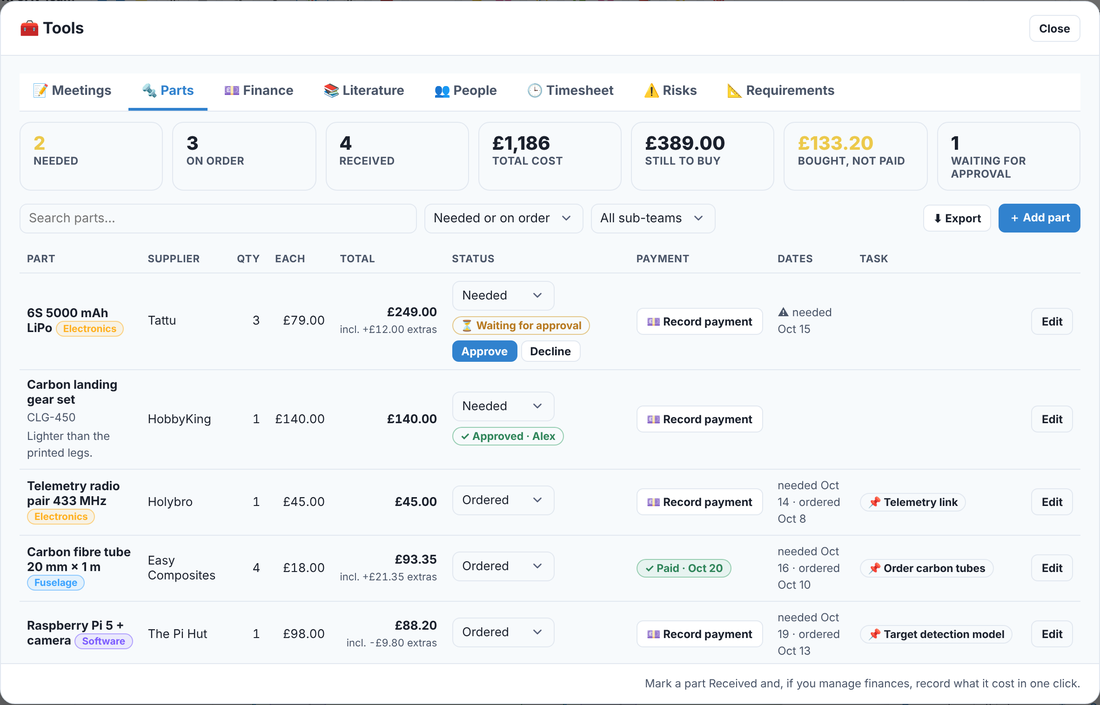
Every part the team needs goes on one shared list, from the flight controller to the M3 bolts. Not one list per sub-team and not a list in a group chat: one list, so anyone can see what's needed, what's on its way and what's already on the shelf.
For each part, record:
- What and where from: the part, the supplier and a link to the exact product.
- How many and how much: quantity, unit price, and the real total including delivery and VAT. Shipping on small orders can add a surprising amount.
- Status: needed, ordered, received, or cancelled.
- Needed by: the date the build stalls without it.
- Who and why: who asked for it, and which task it unblocks.
2. Order by the needed-by date, not by the mood of the week
Lead times sink more student projects than bad design. Motors, batteries, custom PCBs and anything shipped from abroad can take weeks. Work backwards from the needed-by date: if the frame is assembled in week 8 and the motors take three weeks to arrive, the order goes in no later than week 5, ideally earlier.
Two habits make this work. First, look at the "needed" list every week and ask which items are getting close to their date. Second, flag anything with a long lead time the moment it appears on the list, so it gets ordered first rather than last.
3. Link every part to the task it unblocks
A part on its own is just a shopping item. A part linked to a task tells you what's at risk if it's late. When the telemetry radio is linked to "Telemetry link test", everyone can see that the test can't happen until it arrives, and the person running the test knows exactly what to chase.
This also makes stand-ups shorter: "blocked on parts" becomes a specific part, a supplier and a date, not a shrug.
4. Split the budget into lines that match how you build
A single total ("we have £3,000") hides where the money is going until it's gone. Split it into budget lines that follow your sub-teams or systems, for example:
- Airframe and structures
- Electronics and power
- Payload or mechanisms
- Software, sensors and compute
- Tools and consumables (glue, solder, filament, fasteners)
- Travel and competition fees
- Contingency: hold back 10–15% for the things that break
Give each line an owner, usually the sub-team lead, and attach every purchase to a line. Now "are we on budget?" has a real answer for each part of the project.
5. Committed money is spent money
The most common budget mistake on student teams is counting money as spent only when the invoice is paid. By then it's too late. The moment someone places an order, that money is committed: it's going to leave the account whether the invoice has arrived or not.
Track three numbers for every budget line: spent (paid), committed (ordered but not paid yet) and left (budget minus both). If you only watch "spent", the budget will always look healthier than it really is.
6. Agree who approves what
Approvals sound like bureaucracy, but a simple rule saves arguments. A common one: anything over a set amount, say £100, needs a yes from the treasurer or the team lead before it's ordered, and nobody approves their own request. Small consumables can be bought freely within a monthly allowance.
Write the rule down once and apply it to everyone. It stops the surprise £400 order, and it gives the treasurer a chance to say "wait, Electronics already bought one of those".
7. Receipts and reimbursements
Many student societies pay through the students' union, and many purchases happen on someone's personal card and get reimbursed later. Both need a paper trail. For every purchase, keep the receipt, record who paid, which budget line it belongs to and which part or task it was for.
Reimburse quickly. Students who wait months to get their money back stop volunteering to buy things, and then nothing gets ordered on time.
8. Watch the burn rate every week
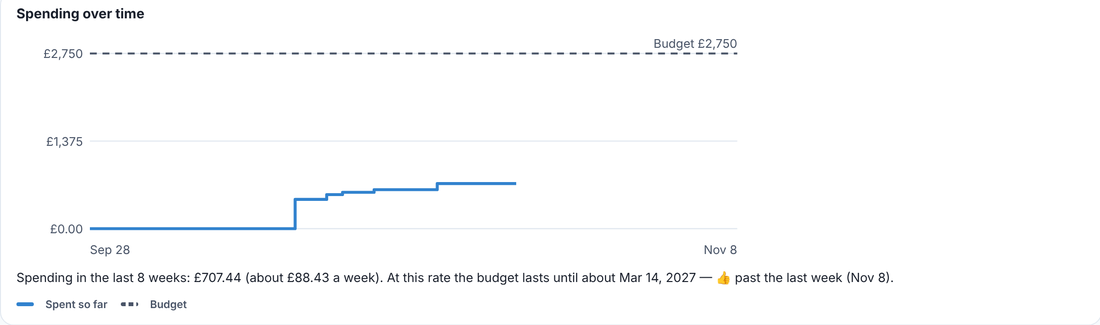
Once spending is recorded with dates, you can see how fast money is going and when the budget runs out at that pace. If you've spent £700 in eight weeks, that's under £90 a week. If the season has twenty weeks left and £1,800 remaining, you're fine. If it has twenty weeks left and £600 remaining, you know now, not in March.
9. Track income too
Sponsorship, union grants, department funding and crowdfunding all arrive at different times and some come with conditions. Record each one with its date and any strings attached (a logo on the robot, a report at the end of the year). In-kind sponsorship counts too: free carbon tubes or discounted PCBs are worth writing down, both for your budget and for thanking sponsors properly.
A weekly 10-minute money check
- Parts: anything "needed" that's within two weeks of its needed-by date? Order it or escalate it.
- Deliveries: anything "ordered" for more than a week longer than expected? Chase the supplier.
- Approvals: clear any waiting requests so nobody is blocked.
- Money: check spent, committed and left for each budget line, and the burn rate.
- Receipts: make sure every purchase from the week has a receipt and a budget line, and reimburse anyone owed.
Ten minutes a week is all it takes, and it's the difference between a team that knows where its money is and a team that finds out at the end of the year.
Do it on the same board as the work
Trawpie keeps parts and money next to the tasks they belong to: a parts list with status, needed-by dates, approvals and the task each part unblocks; budget lines with spent, committed and left; spending with receipts and who paid; and a burn-rate forecast that tells you when the money runs out. Only the roles you choose can see the finances.
Free for student teams of up to 30 people. Try a sample drone, Formula Student, CubeSat or engineering-company team in your browser. No sign-up needed.
More guides: How to plan a student engineering project · How to run a Formula Student season