Your dates on a Gantt chart
Pick your level and dates to see how the template spreads the work.
Trawpie turns it into weekly tasks with checklists, reminds you before each milestone and moves anything unfinished into the next week.
What’s in the template
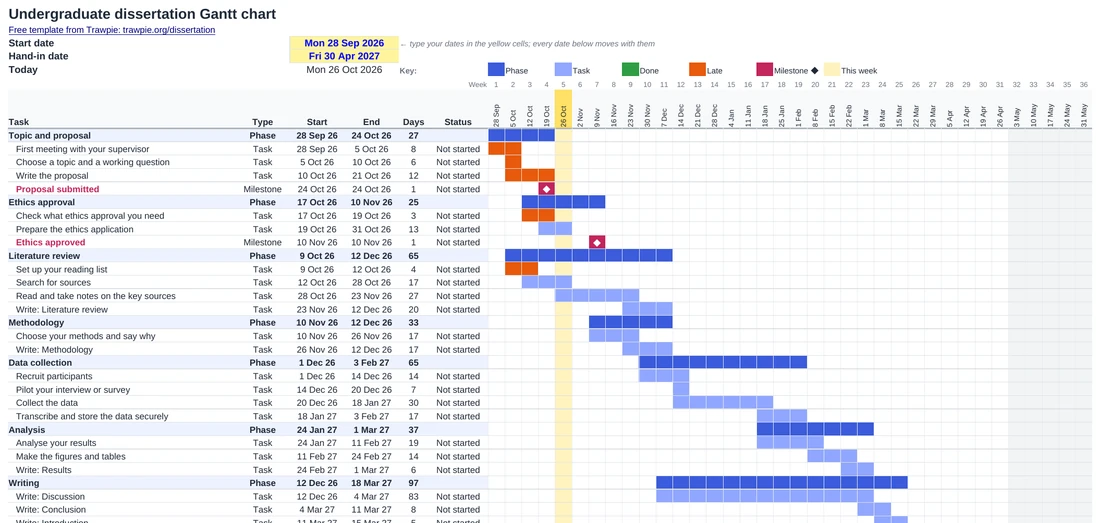
Three sheets, one for each level, plus a page on how to use it. Each sheet starts with a full plan you can keep, change or delete:
- Undergraduate: topic and proposal, ethics approval, literature review, methodology, data collection, analysis, writing, revisions and proofreading, formatting and hand-in. 38 rows, weekly columns.
- Master’s: the same phases squeezed into a summer, with the full draft to your supervisor about 80% of the way in. Weekly columns.
- PhD: three and a half years in monthly columns: literature review and research questions, training, ethics, a pilot study, the upgrade or confirmation review, three studies, papers and conferences, annual reviews, writing up, submission, the viva and corrections.
Every bar is drawn by the spreadsheet, not by hand: tasks that are done turn green, anything past its end date that isn’t done turns orange, and the current week is highlighted, so the chart tells you where you are each time you open it.
How to use it
- Pick your sheet (Undergraduate, Masters or PhD) and type your start and hand-in dates into the two yellow cells.
- Put in your university’s real deadlines. Type over the end date of the proposal, ethics or full-draft rows; your department’s dates always win.
- Make it yours. Rename tasks, delete the ones you don’t need (no ethics if you don’t work with people) and add your own in the empty rows at the bottom.
- Update it every week. Set each task’s Status to In progress or Done. Orange bars are the ones to talk to your supervisor about.
Google Sheets: open Google Sheets, then File ▸ Import ▸ Upload, choose the file and pick “Replace spreadsheet”. The colours and formulas come with it.
A spreadsheet, or a planner that keeps up?
The template
- Free, offline, yours to keep
- Good for a proposal or a meeting with your supervisor
- You update the statuses yourself
Trawpie
- The same plan made from your dates in a minute
- Weekly tasks with checklists, chapter word counts and a proposal helper
- Your supervisor can see it and send feedback on drafts
- Reminders in Google Calendar or Outlook
Lots of students do both: plan in Trawpie, then download the Gantt chart for an appendix or a progress report. Read more about the dissertation planner, or how to make a Gantt chart for a dissertation step by step. For the plan as a whole, see how to plan a dissertation from your hand-in date.
Questions
What should a dissertation Gantt chart include?
The phases of your project (proposal, ethics, literature review, methods, data, analysis, writing, revisions and hand-in), the main tasks inside each, and your milestones: the proposal deadline, ethics approval, the full draft to your supervisor and the hand-in date. Keep it to a page; it’s a plan, not a diary.
How long should each part of a dissertation take?
As a rough guide for an undergraduate or master’s dissertation: the proposal takes the first 10–12% of your time, the literature review runs from about 5% to 35%, data collection or building from 30% to 60%, analysis from 55% to 72%, and writing overlaps most of it until about 80%. Leave the last 20% for revisions, proofreading and formatting.
Do I need a Gantt chart in my dissertation proposal?
Many universities ask for a timeline in the proposal, and a Gantt chart is the clearest way to show one. Use the template, keep the phases and milestones, and paste it in as an image or a table.
Does it work for a PhD thesis?
Yes. The PhD sheet uses months instead of weeks and covers the upgrade or confirmation review, annual reviews, three studies, papers, writing up, submission and the viva.
Is it really free?
Yes. No sign-up and no email. If you’d like the plan to keep itself up to date, Trawpie is free for students too.
Plan it properly
Trawpie lays out your whole dissertation from your hand-in date and helps you keep going until you hand in.