 Trawpie
A good first week takes ten minutes to set up: a few categories each, a handful of tasks, and a habit of looking at the board on Friday.
1. Give everyone a few categories
A category is a row under one person that groups their tasks. Two to four each is plenty.
2. Add tasks into weeks
Press + Add task in any cell, or right-click it. The New task form lets you fill in everything at once: owner, category, helpers, week, status, due date, priority, effort, sub-tasks and notes. Only the title is required.
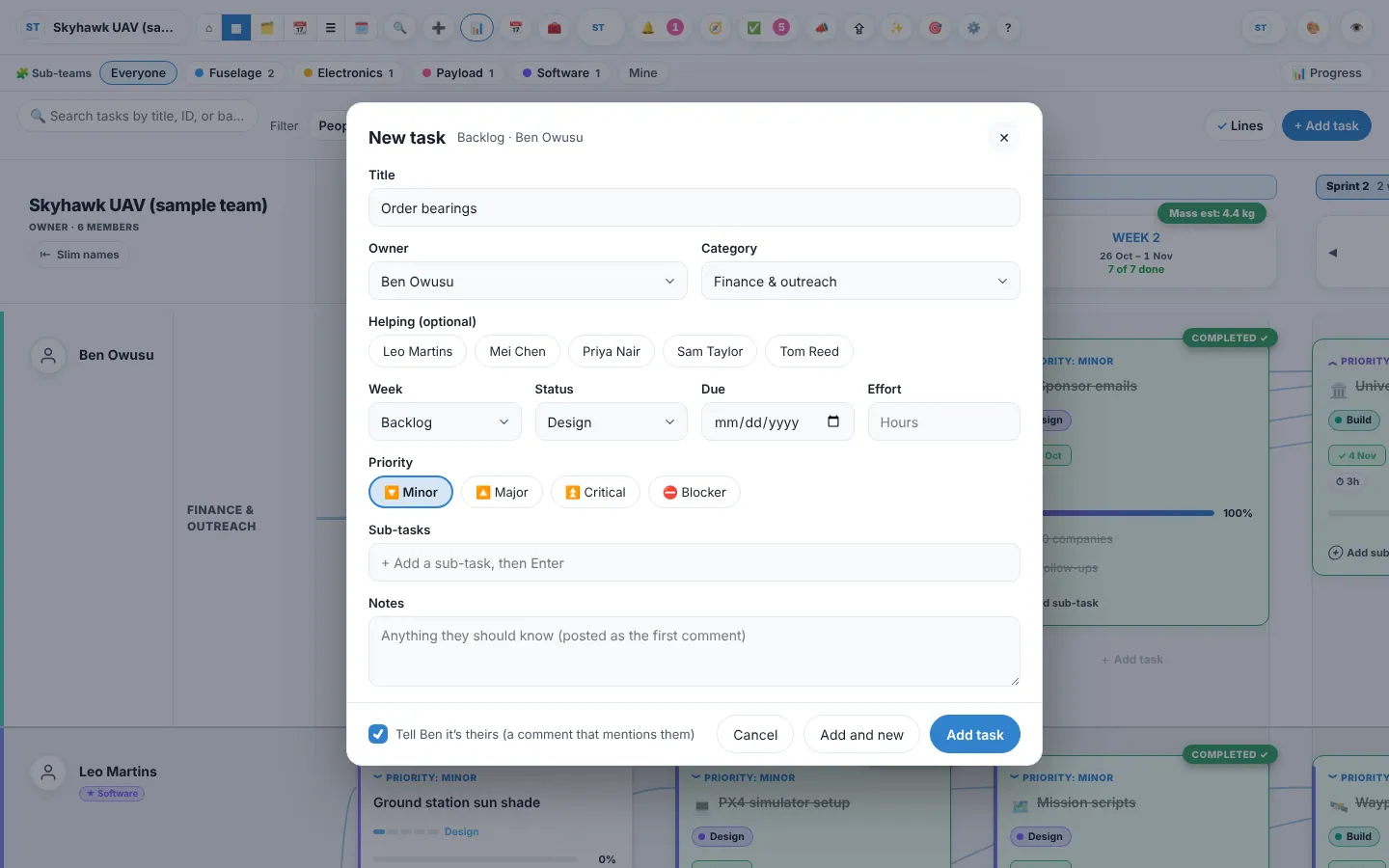
Example
Sam adds “Order bearings” to Hardware in Week 1, due Thursday, with two sub-tasks: “Get three quotes” and “Ask Jo which size”.
3. Work through the week
- Tick sub-tasks as you go: the progress bar follows.
- Drag a card to another week or person to re-plan. Hold Alt while dragging to copy it instead.
- Comment on the card and type @name to ask someone something.
- Mark it done from its menu or the editor. Done cards turn green.
4. On Friday: carry over what’s left
Anything unfinished can carry over into next week. The copy keeps its history and ticked sub-tasks, and a solid blue arrow joins it to the original, so you can see what slipped and how often.
Teams can make this automatic in Settings ▸ Workflow: unfinished tasks move into the new week on their own, and anything carried more than once gets flagged.